Bwin Deposit Data: Tested Methods, Steps & Common Issues
We made a £10 deposit to Bwin using our VISA debit card. The funds cleared and entered our betting account instantly. Check out our full Bwin deposit guide in this review.


Bwin Deposit Methods Compared
Bwin is one of the bigger names in the betting industry, with a vast sportsbook and a gigantic gaming library. Therefore, they offer various payment methods, including debit cards, Apple Pay, PayPal, and Pay By Bank.
Bwin offers low deposit options across its payment methods, with a minimum deposit of £5. If you want to learn more about minimum withdrawal amounts and processing times, check out our Bwin withdrawal time guide.
| Payment Methods | Min Deposit | Max Deposit | Fees | Deposit Time | Triggers Bonus |
|---|---|---|---|---|---|
 Visa | £5 | £2,000 | No fee | Instant | |
 Mastercard | £5 | £2,000 | No fee | Instant | |
 PayPal | £10 | £2,000 | No fee | Instant | |
 Apple Pay | £5 | £2,000 | No fee | Instant | |
 Google Pay | £5 | £2,000 | No fee | Instant | |
 Pay by Bank | £5 | £2,000 | No fee | Instant | |
 PaysafeCard | £5 | £2,000 | No fee | Instant | |
 Neteller | £5 | £2,000 | No fee | Instant | |
 Skrill | £5 | £2,000 | No fee | Instant |
Our Real Money Deposit Test with Visa

Depositing with our Visa debit card at Bwin was quick and easy. After clicking "Deposit", we only needed to follow a few simple steps to complete the transaction. This matched our experience with other Bwin sister sites, which have a very similar deposit process and a clear, user-friendly design.
Some of the standout features include the easy deposit process and the broad range of debit cards, bank transfers, and e-wallets. However, it's worth noting that, as shown in the table above, the welcome offer cannot be claimed when depositing with an e-wallet.
Bwin Deposit Process
Before starting the deposit process, head to the home page and sign up for Bwin. Below is a detailed step-by-step guide on how to deposit at Bwin:
-
Find ‘Deposit’ & Enter Amount

On the top right of the home page, click ‘Deposit’ to start the process and enter your amount.
-
Enter Your Payment Details

Enter your deposit details before proceeding. Bwin will save these for future payments, so you will only have to do this once.
-
Confirm Deposit
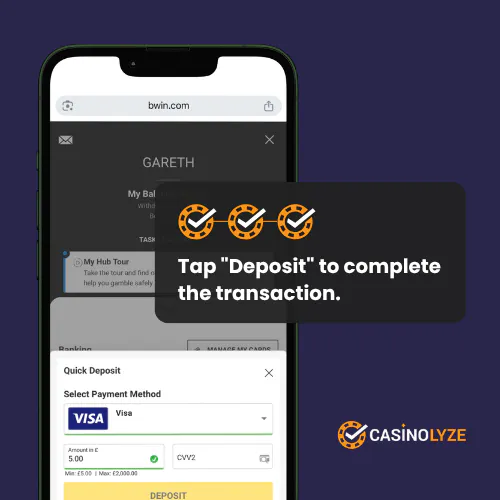
After making sure the amount and card details are correct, you are ready to complete the deposit. Double-check your Bwin account to view your balance.
Bwin Deposit Issues
Very rarely, you may encounter issues when making deposits. First and foremost, check the FAQ section for a potential solution. If the problem cannot be resolved, contact Bwin’s customer support.
-
Declined Payments
Sometimes, your payment might be declined. This could be down to various reasons, such as expired card details, insufficient funds or using a card not owned by you. Check this first before contacting support.
-
Delayed Deposits
Your deposit could also be delayed for various reasons. Bwin could be waiting for extra verification, which can lead to delays. Also, there may be an issue with your account, a system glitch, or slow processing times.


Gareth is an experienced online casino writer, providing reviews and tips for numerous publications for several years. With his passion for casino and sports betting, Gareth gives fair and in-depth analysis to give you the best possible advice. You can reach out to Gareth at any time.